CMMC 2.0 basics for small businesses (Level 1 checklist)
CMMC Level 1 requires you to meet 15 basic cybersecurity practices and pass a self-assessment. There’s no third-party audit, no outside assessor visiting your office, and no fee to the government. You do it yourself, submit the results to SPRS, and have a senior official at your company sign an annual affirmation that it’s accurate.
That’s the short version. Here’s everything a small business owner needs to know about CMMC, why it exists, what it actually requires, and how to get compliant without hiring a $50,000 consultant.
What CMMC is and why DoD created it
CMMC stands for Cybersecurity Maturity Model Certification. It’s a framework the Department of Defense built to verify that defense contractors actually protect sensitive information on their computer systems. Not just promise to protect it. Actually do it.
Before CMMC, the cybersecurity requirement was FAR 52.204-21. That clause has been in government contracts since 2016. It listed 15 security practices that contractors were supposed to follow when handling Federal Contract Information (FCI). The problem? Compliance was self-reported and nobody checked. Contractors could claim they met all 15 requirements, win a contract, and never actually implement any of them.
The DoD found this out the hard way. After years of data breaches and adversaries stealing sensitive defense information through contractor networks, they decided self-reporting without verification wasn’t working. CMMC adds teeth to those same requirements by formalizing the assessment process and tying it directly to contract eligibility.
Plain English: CMMC
CMMC is the government’s way of making sure you actually do the cybersecurity stuff you’ve been claiming to do. Before CMMC, the honor system was the only enforcement. Now there’s a formal assessment, you have to submit results to a government database, and a company executive has to sign their name to it. Lying about your compliance status can trigger False Claims Act liability.
The three CMMC levels (and why most small businesses only need Level 1)
CMMC 2.0 has three levels. Each one protects a different type of information and requires increasingly strict security practices.
Level 1 — Federal Contract Information (FCI). FCI is any information the government gives you or that you create for the government during contract performance, excluding information that’s publicly available. If you have a DoD contract and receive emails, documents, or data from the government that isn’t marked as classified or CUI, that’s FCI. Level 1 requires 15 basic practices and a self-assessment.
Level 2 — Controlled Unclassified Information (CUI). CUI is more sensitive than FCI. It includes things like technical drawings, engineering data, export-controlled information, and certain categories of procurement-sensitive data. Level 2 requires 110 security practices based on NIST SP 800-171 and may require a third-party assessment by a C3PAO (Certified Third-Party Assessor Organization). This is where costs jump significantly.
Level 3 — Highest sensitivity CUI. Level 3 adds 24 practices from NIST SP 800-172 on top of Level 2’s 110. It requires a government-led assessment by DIBCAC (Defense Industrial Base Cybersecurity Assessment Center). Very few small businesses will ever encounter Level 3 requirements.
Most small businesses doing basic contract work, subcontracting, or providing commercial services to DoD need Level 1. You’ll know if you need Level 2 because the solicitation will explicitly state a Level 2 CMMC requirement, and the contract will involve handling CUI. If you’re not sure whether you handle CUI, look at the contract data markings. If nothing is marked CUI, you’re probably dealing with FCI only.
When CMMC requirements take effect
The timeline matters because it determines when you need to be ready.
The program rule (32 CFR Part 170) took effect on December 16, 2024. That established the CMMC framework, assessment processes, and the three levels. But that rule alone didn’t put CMMC into contracts.
The acquisition rule (48 CFR DFARS) was published as a final rule on September 10, 2025, effective November 10, 2025. That’s the one that matters for your contracts. It authorizes contracting officers to insert DFARS clause 252.204-7021 into solicitations and contracts, making CMMC a condition of award.
The rollout is phased:
- Phase 1 (November 10, 2025): Solicitations start requiring Level 1 self-assessments and Level 2 self-assessments.
- Phase 2 (November 2026): Solicitations begin requiring Level 2 certification (third-party assessment).
- Phase 3 (November 2027): Level 3 certification requirements appear in solicitations.
- Phase 4 (November 2028): Full implementation across all applicable DoD solicitations and contracts.
If you’re bidding on DoD contracts right now, your Level 1 self-assessment should already be submitted to SPRS. Contracting officers are checking SPRS before awarding contracts. No current CMMC status in SPRS means you’re ineligible.
The 15 Level 1 practices (in plain English)
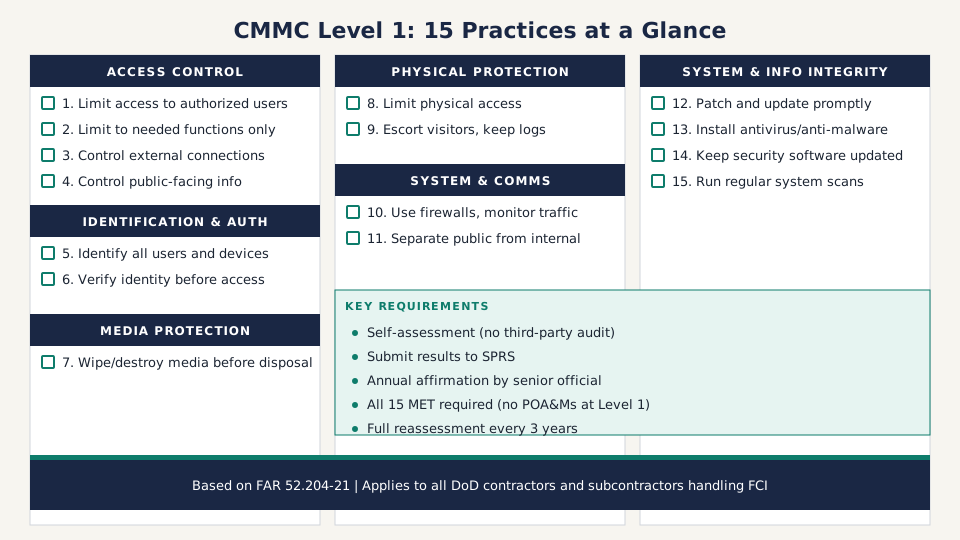
Level 1 maps directly to FAR 52.204-21. These are the same 15 practices that have been required since 2016. CMMC just formalized how you prove you’re doing them. They fall into six domains.
Access control (4 practices)
1. Limit system access to authorized users. Only the people, software processes, and devices you’ve approved should be able to access your systems. If you have employees who left six months ago and their accounts are still active, you’re not meeting this one.
2. Limit users to what they need. Don’t give everyone admin access. An accounts payable clerk doesn’t need access to engineering files. Match system permissions to actual job duties.
3. Control connections to external systems. Know what external systems connect to yours and manage those connections. This includes VPN connections, cloud services, and any third-party tools that touch your network.
4. Control public-facing information. If you have a website, portal, or any system accessible to the public, control what gets posted. Don’t accidentally publish FCI on your company website or an unsecured file share.
Identification and authentication (2 practices)
5. Identify users, processes, and devices. Everyone and everything that accesses your systems should have a unique identifier. Shared accounts like “admin” or “frontdesk” make it impossible to track who did what.
6. Verify identity before granting access. Use passwords, PINs, or other authentication methods. This is where multi-factor authentication comes in, though Level 1 doesn’t specifically require MFA. At minimum, use strong, unique passwords.
Media protection (1 practice)
7. Sanitize or destroy media before disposal. When you get rid of a hard drive, USB drive, laptop, or any storage media that contained FCI, wipe it clean or destroy it physically. Tossing an old laptop in the dumpster without wiping the drive is a violation.
Physical protection (2 practices)
8. Limit physical access to your systems. Lock the server room. Don’t leave laptops with FCI on them in unlocked cars. Control who can physically touch the equipment that stores or processes government data.
9. Escort visitors and maintain access logs. If someone who isn’t an authorized employee visits your office where FCI systems are located, escort them. Keep a log of who visited, when, and where they went. Manage keys, badges, and access cards.
System and communications protection (2 practices)
10. Monitor and protect communications at system boundaries. Use a firewall. Monitor what comes in and goes out of your network. Protect data in transit between your systems and external networks.
11. Separate public-facing systems from internal networks. If you have a public website, it should be on a separate network segment from your internal systems where FCI lives. A compromised website shouldn’t give an attacker direct access to your internal files.
System and information integrity (4 practices)
12. Fix system flaws promptly. Apply security patches and software updates in a timely manner. That Windows update you’ve been ignoring for three months? Run it.
13. Install malware protection. Run antivirus/anti-malware software on systems that process FCI. This includes workstations, servers, and any endpoints that touch government data.
14. Keep malware protection updated. Set your security software to auto-update. An antivirus tool running signatures from six months ago isn’t protecting you from current threats.
15. Run regular system scans. Perform periodic scans of your systems and scan files from external sources (email attachments, downloads) in real time. Most modern endpoint protection handles this automatically.
Plain English: what most of this boils down to
If you’re a small business with 5-20 employees, here’s the reality: use unique accounts for everyone, set up reasonable passwords, install antivirus software and keep it updated, run Windows updates, use a firewall, lock the office door, and wipe old computers before you get rid of them. You’re probably already doing most of this. The gap is usually documentation and the formal areas like visitor logs and media disposal tracking.
How to do your Level 1 self-assessment
The self-assessment process is straightforward, but it has specific steps and a submission requirement. Here’s how it works.
Step 1: scope your assessment
Determine which systems handle FCI. This is your “assessment scope.” For most small businesses, it’s your entire IT environment because FCI flows through email, file shares, and laptops used for contract work. You can narrow the scope by isolating FCI onto specific systems, but for a 5-20 person company, that’s usually more trouble than it’s worth.
Step 2: assess each practice
Go through all 15 practices and determine whether you meet each one. For Level 1, there are only two answers: MET or NOT MET. There’s no partial credit. Either you do it or you don’t.
Here’s the part that catches people off guard: Level 1 does not allow Plans of Action and Milestones (POA&Ms). At Level 2, you can get a conditional certification and fix gaps later. At Level 1, every single practice must be MET. All 15. No exceptions, no remediation timeline, no conditional status.
If you have gaps, fix them before you submit.
Step 3: submit results to SPRS
Go to SPRS and enter your self-assessment results. You’ll need your CAGE code, the date you completed the assessment, and whether the scope covers your entire enterprise or a specific enclave.
Step 4: annual affirmation
A senior official at your company (the Affirming Official) must sign an affirmation in SPRS that the assessment is accurate and that your organization complies with the requirements. This affirmation is valid for one year and must be renewed annually. The full self-assessment must be redone every three years.
Compliance warning: the affirmation isn’t a checkbox exercise
When your senior official signs that SPRS affirmation, they’re making a legal representation to the federal government. If the assessment says you meet all 15 practices and you actually don’t, that’s potentially a False Claims Act violation. MORSE Corp paid $4.6 million in 2025 for submitting false SPRS scores. Health Net Federal Services settled for $11.25 million in the same year for falsely claiming cybersecurity compliance. The DoJ’s Civil Cyber-Fraud Initiative is actively pursuing these cases. Don’t submit an affirmation that isn’t true.
Step 5: retain documentation
Keep all evidence supporting your assessment for six years from the status date. If DoD audits your self-assessment, you’ll need to prove that each practice was actually implemented when you claimed it was.
What Level 1 costs (realistically)
Level 1 is designed to be achievable for small businesses without major investment. Here’s what the costs actually look like.
If you’re already following basic cybersecurity hygiene: Near zero in new spending. Your main cost is the time it takes to document what you’re doing, walk through the 15 practices, and submit to SPRS. For a small business owner who’s reasonably organized, that’s 1-2 days of focused work.
If you have gaps to close: The typical costs are the kind of IT spending you should be doing anyway. Antivirus software runs $30-$60 per endpoint per year. A basic firewall appliance is $200-$500 for a small office. A managed IT provider can help you set up proper user accounts, patch management, and network segmentation for $500-$2,000 as a one-time project.
What you don’t need for Level 1: You don’t need a consultant. You don’t need a C3PAO. You don’t need a managed security operations center. You don’t need to hire a CISO. You don’t need SIEM software or a GRC platform. Save that spending for Level 2 if you ever need it. Level 1 is meant to be done by the business owner with existing IT resources.
Common mistakes small businesses make with CMMC
Assuming CMMC doesn’t apply to subcontractors. It does. CMMC requirements flow down to subcontractors. If the prime contract requires CMMC Level 1, every subcontractor handling FCI on that contract must also meet Level 1. This applies equally whether you’re a prime contractor or subcontractor.
Waiting until a solicitation requires it. Contracting officers started checking SPRS for CMMC status on November 10, 2025. If you haven’t submitted your self-assessment by the time you find a solicitation you want to bid on, you’re already behind. The assessment should be done proactively, not reactively.
Confusing Level 1 and Level 2. Level 2 is a completely different scale of effort. It has 110 practices instead of 15, requires NIST SP 800-171 implementation, may need a third-party assessor, and can cost $50,000-$200,000+ depending on your environment. Don’t panic about CMMC costs until you know which level you actually need. For most small businesses doing basic contract work, Level 1 is sufficient.
Overthinking the assessment. Level 1 is 15 practices that map to common-sense cybersecurity. If you use passwords, run antivirus, apply updates, and lock your office, you’re most of the way there. The assessment isn’t a mystery. Read each practice, check whether you do it, and document your answer.
Not reading the solicitation. When you read a government solicitation, check Section H (Special Contract Requirements) and the DFARS clauses for the specific CMMC level required. The solicitation tells you exactly what level you need. Don’t assume.
How CMMC fits into your first year of govcon
If you’re in your first 30 days of government contracting, CMMC doesn’t need to be your first priority. Get your SAM.gov registration done, build your capability statement, and figure out your target market first. But don’t wait too long. Once you start bidding on DoD work, your CMMC self-assessment needs to be in SPRS.
The practical sequence looks like this:
- Complete SAM.gov registration and get your CAGE code
- Build your capability statement
- Do your CMMC Level 1 self-assessment
- Submit results to SPRS and have your senior official sign the affirmation
- Start bidding on DoD contracts
If you’re pursuing subcontracting opportunities with defense primes, having your CMMC Level 1 in SPRS before you start outreach makes you a more attractive sub. Primes don’t want to team with a subcontractor who can’t pass a basic cybersecurity assessment. It’s one more thing they’d have to worry about, and they’ve got enough compliance headaches already.
Next step: Pull up SPRS and create an account if you don’t have one. Walk through the 15 practices in this article against your actual IT setup. Mark each one MET or NOT MET. Fix any gaps. Then submit your Level 1 self-assessment and get it on record. You can do the whole thing in a weekend.