What is a CAGE code? (and how to get one)
A CAGE code (Commercial and Government Entity code) is a five-character alphanumeric identifier that the Defense Logistics Agency (DLA) assigns to every business that does work with the federal government. You get one automatically when you register in SAM.gov, it’s completely free, and you need it before you can bid on contracts or receive payments.
If you’re registering in SAM.gov for the first time, you don’t need to apply for a CAGE code separately. SAM handles it. But knowing what the code is, why it exists, and what to do when something goes sideways with the assignment will save you weeks of frustration.
Why CAGE codes exist
The Department of Defense created the CAGE system decades ago to track every company, agency, and entity in its supply chain. Think of it as a postal code for the procurement world — except instead of identifying a geographic area, it identifies a specific business at a specific physical address.
The DLA maintains the database. Every prime contractor, subcontractor, and grant recipient in the federal ecosystem gets a CAGE code. The code itself is just five characters — a mix of letters and numbers with no encoded meaning. 3A4B7 doesn’t tell you anything about the company it belongs to. It’s simply a unique tag that the government uses to look you up.
Plain English: CAGE code
Your CAGE code is your business’s ID number in Defense Department systems. It’s five characters, assigned for free by the Defense Logistics Agency, and you get it automatically when you register in SAM.gov. You’ll see it on contracts, capability statements, and any defense-related paperwork.
International companies get a version called an NCAGE code (NATO CAGE), managed through the NATO Support and Procurement Agency. Same concept, different issuing body.
CAGE code vs UEI: they’re not the same thing
This trips people up constantly. Your UEI (Unique Entity Identifier) is a 12-character code assigned by SAM.gov that identifies your legal entity across all federal agencies. Your CAGE code is a five-character code assigned by DLA that identifies your business at a specific physical location.
The difference matters when you have multiple offices. Say your company has a headquarters in Austin and a second office in Tampa, both performing government work. You get one UEI for the entire company, but each location gets its own CAGE code. DLA ties each code to a specific address.
| CAGE code | UEI | |
|---|---|---|
| Format | 5-character alphanumeric | 12-character alphanumeric |
| Issued by | Defense Logistics Agency (DLA) | SAM.gov (GSA) |
| Identifies | A business at a specific physical address | A legal entity as a whole |
| Multiple locations | Separate code for each location | One per legal entity |
| Cost | Free | Free |
| Renewal | Every 5 years (auto-renewed with annual SAM renewal) | Renewed with annual SAM registration |
Both are required for federal contracting. Both are free. Neither one replaces the other.
If you’re still sorting out the difference between UEI and the old DUNS number, our DUNS vs UEI breakdown covers the full transition.
How to get a CAGE code
For most businesses, you don’t apply for a CAGE code directly. The process is baked into SAM.gov registration.
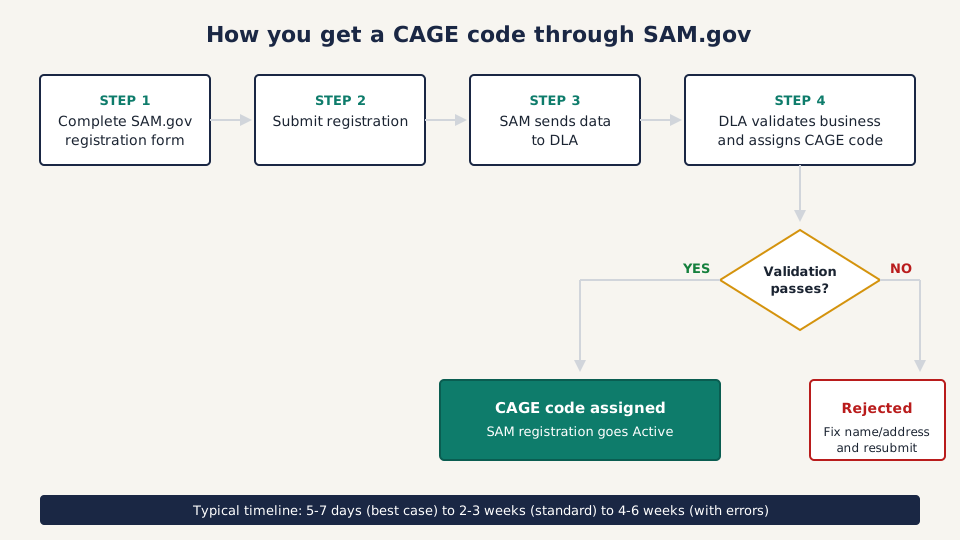
Here’s what happens:
- You go to SAM.gov and complete your entity registration — legal business name, EIN/TIN, physical address, NAICS codes, banking information, points of contact
- You submit the registration
- SAM.gov sends your entity data to the DLA CAGE Program Office
- DLA reviews your information, validates your business, and assigns a five-character CAGE code
- The CAGE code gets linked back to your SAM.gov registration
- Your registration goes “Active” once CAGE validation completes
That’s it. You don’t fill out a separate form. You don’t go to a different website. SAM handles the handoff to DLA behind the scenes.
If you haven’t started your SAM.gov registration yet, the complete registration guide walks through every field, including the parts where people get stuck.
How long does it take?
DLA’s official processing window is vague. In practice:
- Best case: 5-7 business days when all your data is clean
- Typical: 2-3 weeks
- With errors or follow-up questions from DLA: 4-6 weeks
The CAGE code assignment is often the step that holds up your entire SAM.gov registration. Your registration won’t go “Active” until DLA finishes their validation. So if you’re watching your SAM.gov status sit at “Submitted” for two weeks, the CAGE code is probably the bottleneck.
Can you get a CAGE code without SAM.gov?
Yes, but it’s uncommon. You can request a CAGE code directly through DLA’s website at cage.dla.mil if you need one for a specific situation that doesn’t require full SAM.gov registration. This path exists mainly for entities involved in DoD logistics or security clearance processes where SAM registration isn’t required.
For 95% of businesses entering government contracting, SAM.gov is the only path you need.
Who needs a CAGE code
If you plan to do any of these things, you need one:
- Bid on federal contracts as a prime contractor
- Work as a subcontractor to a federal prime contractor
- Apply for federal grants (with some exceptions — see below)
- Obtain a facility security clearance
- Perform work involving classified materials at any tier
The subcontractor question
There’s no blanket federal rule that says every subcontractor must have a CAGE code. Whether you need one depends on the specific contract terms between you, the prime contractor, and the government. But here’s the reality: most prime contractors will ask for your CAGE code before they’ll put you on a team. It’s a basic credibility check. If you’re serious about subcontracting, get registered in SAM.gov and get the code.
For classified work, there’s no ambiguity. Every subcontractor performance location listed on a DD Form 254 (the security classification document) must have a corresponding CAGE code.
Who might not need one
If your business registers in SAM.gov exclusively for financial assistance (grants, not contracts) and you’re not seeking money from the Department of Defense, you may no longer need a CAGE code. This is a relatively recent change that streamlines the process for nonprofits, universities, and other grant-only entities.
If your registration purpose later changes to include contracts, DLA will assign a CAGE code at that point.
Common CAGE code problems (and how to fix them)
Your CAGE code is stuck in processing
This is the most common complaint. You submitted your SAM.gov registration, got the confirmation email, and then… nothing. Weeks pass with no CAGE code assignment.
First, check your SAM.gov registration status. Log in, go to Entity Management, and look at the registration status. If it says “Submitted” or “Work in Progress,” the CAGE code is likely the holdup.
What to do: Contact the Federal Service Desk at fsd.gov. They can check the status of your CAGE code request with DLA. You can also call DLA’s Customer Interaction Center directly at (877) 352-2255.
Don’t submit a second SAM.gov registration hoping to speed things up. That creates duplicate records and makes everything worse.
Name or address mismatch
This is the number one reason CAGE code assignments get rejected. Your legal business name in SAM.gov must match your IRS records exactly. That means if the IRS has “Smith Consulting LLC” and you typed “Smith Consulting, LLC” (with a comma) in SAM.gov, that can trigger a mismatch.
Same goes for your physical address. DLA validates that your business operates at the address you listed. PO boxes get rejected. Virtual mailbox addresses get rejected unless your lease specifically lists an exclusive office or desk number.
If your SAM.gov registration was rejected and you’re troubleshooting errors, the CAGE code validation failure is usually tied to one of these name or address issues.
Duplicate CAGE codes
If someone previously registered a business at your address — a former tenant, a previous owner, or an older version of your own company — the system may flag a duplicate. This creates a mess where DLA thinks you already have a code, but the existing code is tied to the wrong entity.
Before you register, search for your business name and address at cage.dla.mil. If an old or incorrect CAGE code shows up, contact DLA to get it deactivated or corrected before you submit your SAM.gov registration. Trying to register over the top of a stale record adds weeks to the process.
Your CAGE code expired
CAGE codes issued after August 26, 2016 expire after five years of inactivity. But if you maintain an active SAM.gov registration (renewed annually), your CAGE code stays current automatically. The annual SAM renewal keeps your CAGE code alive.
If you let your SAM.gov registration lapse and your CAGE code expires, you’ll need to reactivate both. Start with SAM.gov registration — the CAGE code renewal will happen as part of that process.
For the full SAM renewal timeline and what to watch for, see the SAM.gov renewal guide.
Where your CAGE code shows up
Once you have it, your CAGE code follows you through the entire federal contracting lifecycle:
- Capability statements. Every capability statement you send to a contracting officer or prime contractor should list your CAGE code alongside your UEI, NAICS codes, and set-aside certifications. Our first 30 days checklist covers building your capability statement.
- Proposals and bids. Federal solicitations will ask for your CAGE code. It’s typically a required field on Standard Form 33 (SF-33) and in SAM.gov representations and certifications.
- Contract awards. The CAGE code appears on your contract documents and in FPDS (Federal Procurement Data System), the government’s contract tracking database.
- Security clearance applications. If you’re pursuing facility clearances through DCSA (Defense Counterintelligence and Security Agency), the CAGE code is your primary identifier.
- Subcontracting plans. Prime contractors list subcontractor CAGE codes in their subcontracting plans submitted to contracting officers.
How to look up a CAGE code
Two free options:
DLA’s CAGE search tool at cage.dla.mil. Enter a business name, CAGE code, or address and the tool returns matching records. This is the authoritative source — it’s DLA’s own database.
SAM.gov entity search. Search by business name or UEI to pull up an entity’s full profile, which includes the CAGE code. This is the same public database that contracting officers use to verify vendors.
Both tools are free and don’t require a login to search.
Don’t pay for something that’s free
This warning shows up in every registration guide we write because the scams never stop. Your CAGE code is free. SAM.gov registration is free. Any company that contacts you offering to “activate,” “expedite,” or “renew” your CAGE code for a fee is running a scam.
These outfits scrape the SAM.gov public database for new registrations, then send official-looking letters and emails demanding $2,500 or more. The emails won’t come from a .gov address. That’s your first red flag.
If you want free, legitimate help with SAM.gov registration and CAGE code issues, contact your local APEX Accelerator (formerly PTAC). These are federally funded counselors whose entire job is helping small businesses get into government contracting. Find one at apexaccelerators.us.
Your CAGE code and SAM.gov registration are the foundation. Once they’re in place, you can start finding opportunities, building past performance, and putting together bids. If you’re still early in the process, the first 30 days checklist maps out exactly what to do after your registration goes active. And if you’re building your government contracting vocabulary, the acronym glossary covers every abbreviation you’ll run into along the way.