SAM.gov registration guide: UEI, CAGE code, and checklist
Updated July 2026. This guide reflects current SAM.gov registration basics, including Login.gov authentication, Unique Entity ID assignment, annual renewal, and official SAM.gov guidance that registration can take up to 10 business days to become active after submission and validation.
To bid directly on federal contracts, your business needs an active SAM.gov registration. The registration is free, your Unique Entity ID is assigned during the SAM.gov flow, and a U.S. CAGE code is handled as part of the federal registration process. Do not pay a third-party site just to get a UEI or CAGE code.
The catch is that “free” does not mean “casual.” You need your legal business name exactly as the IRS has it, your EIN, a physical address, NAICS codes, bank information, and a real person ready to manage the account. If those details are wrong, validation can stall or fail.
I spent six weeks getting my first SAM.gov registration approved. Three of those weeks were wasted on mistakes nobody warned me about. So here’s the full process, zero to active registration, with the specific details that trip up most first-time registrants.
Start here: which path do you actually need?
Before you register, be clear about what you are trying to do. SAM.gov gives you two different starting paths, and choosing the wrong one wastes time.
| Your goal | What you need | Read next |
|---|---|---|
| Bid directly as a prime contractor | Full SAM.gov entity registration with active status | This guide, then the first 30 days checklist |
| Report as a sub-awardee or identify your entity | Unique Entity ID only, if you are not applying directly for awards | DUNS vs UEI |
| Work under an existing prime | Often a UEI, CAGE code, capability statement, and whatever the prime requires | How to find subcontracting work |
| Chase set-aside contracts | Active SAM.gov registration first, then the right certification | Set-aside certifications guide |
The registration process at a glance
Before we get into the details, here’s the full process from zero to active registration. Each step is covered in the sections below.
- Create a Login.gov account and configure multi-factor authentication (MFA) — same day
- Start SAM.gov entity registration and get your UEI — same day
- Complete all registration sections: core data, entity type, IRS TIN validation, financials, reps and certs, points of contact (2-4 hours)
- Choose your NAICS codes and confirm the matching SBA size standards (part of registration)
- Submit and wait for IRS TIN validation (3-7 business days)
- Complete entity validation with a notarized letter (7-14 business days)
- Monitor status via SAM.gov; open a workspace ticket at fsd.gov if validation stalls past 14 business days
- CAGE code assigned automatically (runs in parallel)
- Registration goes Active — you’re eligible to bid (2-4 weeks total for a clean submission)
If any step gets rejected, see the SAM.gov rejection troubleshooting guide for how to fix each error and resubmit.
What you’ll need before you start
Gather these before you touch SAM.gov. Starting the registration and then scrambling for documents mid-process causes more delays than anything else.
- Your legal business name, exactly as the IRS has it. Not your DBA. Not the name on your business cards. The name on your IRS CP-575 or 147C letter, character-for-character.
- Your EIN (Employer Identification Number). Sole proprietors can use an SSN, but get an EIN first. It’s free and takes minutes on the IRS website.
- Your IRS CP-575 or 147C letter. The letter the IRS sent when they assigned your EIN. Lost it? Request a 147C by calling (800) 829-4933.
- Business bank account details. Routing number and account number for electronic funds transfer.
- Physical business address. P.O. boxes don’t work as your primary address.
- Your NAICS codes picked out. More on choosing these below.
Plain English: SAM.gov
SAM.gov (System for Award Management) is the federal government’s vendor database. If your business isn’t in SAM.gov with an “Active” status, you can’t bid on federal contracts, receive contract awards, or get paid. Registration is free. Think of it as the federal equivalent of getting a business license — except it covers every federal agency at once.
Plain English: EIN (Employer Identification Number)
Your EIN is a nine-digit number the IRS assigns to your business for tax purposes. It’s like a Social Security number for your company. You need one to open a business bank account, file business taxes, and register in SAM.gov. Getting an EIN is free and takes about 10 minutes on the IRS website.
Warning: Do not start your SAM.gov registration until you have your IRS letter in hand. The number one cause of rejection is a mismatch between the business name you type into SAM.gov and the name the IRS has on file. Even “LLC” vs “L.L.C.” will fail validation.
If you are still picking your codes, pause here and use the NAICS code lookup guide. Your NAICS codes affect which opportunities you find, whether you qualify as small for that opportunity, and how primes search for you later.
Step 1: Create a Login.gov account (with MFA)
SAM.gov requires a Login.gov account for authentication. This is not optional — you cannot access SAM.gov to register or manage your entity without one.
Go to login.gov and create an account with your business email. During setup, Login.gov requires you to configure multi-factor authentication (MFA). Your options include:
- An authentication app (recommended — Google Authenticator, Authy, or similar)
- SMS text message codes
- A physical security key
- Backup codes
Plain English: Login.gov and MFA
Login.gov is a shared federal login system — one account that works across many government websites. Multi-factor authentication (MFA) means you need both your password and a second verification step (like a code from an app on your phone) to log in. This protects your SAM.gov registration from unauthorized changes. Set up an authenticator app rather than SMS if you can — it’s more reliable when you’re mid-registration and don’t have cell service.
Login.gov and SAM.gov are separate systems run by separate agencies. Your Login.gov account is just the key to get in the door. If you already have one from USAJOBS, Grants.gov, or another federal site, use that — you don’t need a new one.
Step 2: Get your UEI number
The Unique Entity Identifier (UEI) replaced the old DUNS number in April 2022. If older guides tell you to get a DUNS from Dun & Bradstreet, ignore that. DUNS numbers are dead for federal purposes.
When you start a new entity registration in SAM.gov, the system checks whether your business already has a UEI. If not, it generates one during registration. You don’t apply for a UEI separately. It’s built into the SAM.gov flow.
The UEI is a 12-character alphanumeric code. It looks something like JF1KP39RE4Z7. Write it down. You’ll put this number on every federal form and contract for as long as your business exists.
Plain English: UEI (Unique Entity Identifier)
The UEI is your business’s federal ID number — a 12-character code like JF1KP39RE4Z7. It’s free, permanent, and assigned automatically when you register in SAM.gov. You’ll put this number on every federal form and contract for as long as your business exists. Any website charging you money for a UEI is selling you something you can get for $0.
Three things worth knowing:
- The UEI doesn’t expire, but your SAM.gov registration does (annually). Lapsed registration = can’t bid.
- If you had a DUNS number, your profile was migrated automatically and a UEI was assigned. Search for your entity in SAM.gov to find it.
- You can get a UEI without full SAM.gov registration. There’s a “UEI only” option for entities that just need the identifier for grant applications.
Step 3: Complete your SAM.gov entity registration
Log into SAM.gov, go to Entity Registrations, and click “Register New Entity.” The registration has several sections.
Core data. Enter your legal business name, physical address, and entity start date. The “Legal Business Name” field must match your IRS records exactly. If the IRS has “Smith Consulting Services LLC” and you type “Smith Consulting Services, LLC” with a comma, validation fails. Pull out that CP-575 letter and copy it character by character.
Entity type. Sole proprietor, LLC, S-Corp, partnership, etc. Pick what matches your IRS filing status.
IRS TIN validation. SAM.gov sends your TIN and business name to the IRS for verification. This is the step that causes the most rejections. Common failures: name doesn’t match IRS records, using a DBA instead of the legal name, typos in the EIN, or leading zeros dropped from the EIN.
Tip: Upload your IRS CP-575 or 147C letter when the system asks for supporting documentation. This gives the Federal Service Desk something to reference if validation stalls, and it can speed up manual review.
Financial information. Your bank routing and account numbers. This is how the government pays you on actual contracts. Double-check these.
Representations and certifications. A long section asking about your business size, ownership demographics, domestic manufacturing, and other regulatory items. Answer honestly. These answers determine whether you qualify for small business set-asides. One change to watch: the Revolutionary FAR Overhaul rolling out in 2026 will move some of these certifications from the registration level to individual solicitations.
Points of contact. Government business POC, electronic business POC, and optionally a past performance POC. Use email addresses you actually check. The Federal Service Desk contacts these if there are problems.
Step 4: Choose your NAICS codes (and don’t overdo it)
NAICS codes tell the government what your business does. Every federal contract is assigned a NAICS code, and contracting officers search SAM.gov for vendors by code.
You can register up to 1,000 codes. Don’t.
Listing 50 unrelated codes tells a contracting officer you’re either unfocused or gaming the system. A landscaping company that also claims to do cybersecurity consulting and medical device manufacturing doesn’t look versatile. It looks suspicious.
Start with 3 to 5 codes that match your current capabilities. Only select codes for work you can perform today. If you’re an IT services company, pick 541512 (computer systems design), 541511 (custom programming), and maybe one or two others. Don’t add construction codes because you “might expand someday.”
How to find the right codes:
- Search the Census Bureau’s NAICS database at census.gov/naics
- Read the full description of each code, not just the title
- Check SBA size standards for each code. Your NAICS code determines whether you’re “small” for that type of work. Revenue thresholds ($16.5 million is common) and employee counts vary by code.
Plain English: NAICS codes
NAICS codes are six-digit numbers that categorize what your business does. The government uses them to match contracts with vendors. When an agency needs IT consulting, they search SAM.gov for vendors registered under the IT consulting NAICS code. Too few codes and you miss opportunities. Too many and you look unfocused. Three to five codes is the right starting point.
Step 5: Your CAGE code (it comes to you)
The Commercial and Government Entity (CAGE) code is a five-character ID assigned by the Defense Logistics Agency. Good news: you don’t apply for it separately.
Plain English: CAGE code
A CAGE code is a five-character ID (like 3ABC4) that identifies your business in Department of Defense systems. You don’t apply for it — it’s assigned automatically when your SAM.gov registration clears. Any website charging you for a CAGE code is selling something you get for free.
For U.S. businesses, the CAGE code is assigned automatically after your SAM.gov registration clears validation. It typically appears in your entity record 5-10 business days after validation, running in parallel with other processing.
International businesses need an NCAGE code from their country’s NATO codification bureau before registering in SAM.gov.
Step 6: Entity validation and the notarized letter
This step surprises everyone. SAM.gov requires entity validation to confirm the person registering is authorized to act for the business. For many registrants, this means a notarized Entity Administrator Appointment Letter (EAAL).
Plain English: Entity validation and the EAAL
Entity validation is the government’s way of confirming that you — the person clicking buttons in SAM.gov — are actually authorized to represent the business. The EAAL (Entity Administrator Appointment Letter) is a one-page form where an authorized person at your company (the owner, CEO, or managing member) says “yes, this person is allowed to manage our SAM.gov account.” You get it notarized at any UPS Store, bank, or notary office for $5-$15.
The process:
- SAM.gov emails you a link to the EAAL template
- Fill out the template with your entity info and administrator details
- An authorized official (CEO, managing member, or partner) signs it
- A notary public notarizes it
- Upload it to SAM.gov or email it to the Federal Service Desk
This letter gets rejected more often than you’d think. Top reasons:
- Information mismatch. Email, phone, or address in the letter doesn’t match your SAM.gov registration. Check every field.
- Missing UEI digits. All 12 characters. Don’t drop leading zeros.
- No administration preference. The template asks if you’ll self-administer or use a third-party agent. You must choose one.
- Wrong signer. Must be someone with legal authority. For an LLC, that’s the managing member.
Tip: Compare every field in the letter against your SAM.gov registration before visiting the notary. Reprinting is cheaper than resubmitting.
Step 6b: Checking your validation status and submitting a workspace ticket
After you upload your notarized letter, validation does not happen instantly. Here’s how to track where things stand and what to do if the process stalls.
Checking your status:
- Log into SAM.gov with your Login.gov credentials
- Go to “Entity Management” and click on your entity
- The registration status will show as “Pending” until validation clears, then “Active”
You can also check the Federal Service Desk case status at fsd.gov if you submitted your letter via email or have an open case.
If validation stalls beyond 14 business days:
SAM.gov uses a workspace ticket system for validation issues. If your entity validation is stuck:
- Go to fsd.gov and click “Submit a Case”
- Select “SAM.gov” as the system and “Entity Validation” as the issue type
- Include your UEI, the date you submitted your notarized letter, and any case numbers from prior correspondence
- You’ll receive a ticket number — use this in all follow-up communications
The Federal Service Desk can see exactly where your validation is in the queue and whether there’s a specific problem holding it up. Don’t wait passively if 14 business days have passed without a status change. Submit a ticket and ask for an update.
Plain English: workspace ticket
A workspace ticket is just a support case you open with the Federal Service Desk (fsd.gov) when something in SAM.gov isn’t moving. Think of it like customer support for your SAM.gov registration. You describe the problem, they look up your entity in the back-end system, and they can often identify and resolve issues that don’t surface in the public-facing status page.
Timeline: what to actually expect
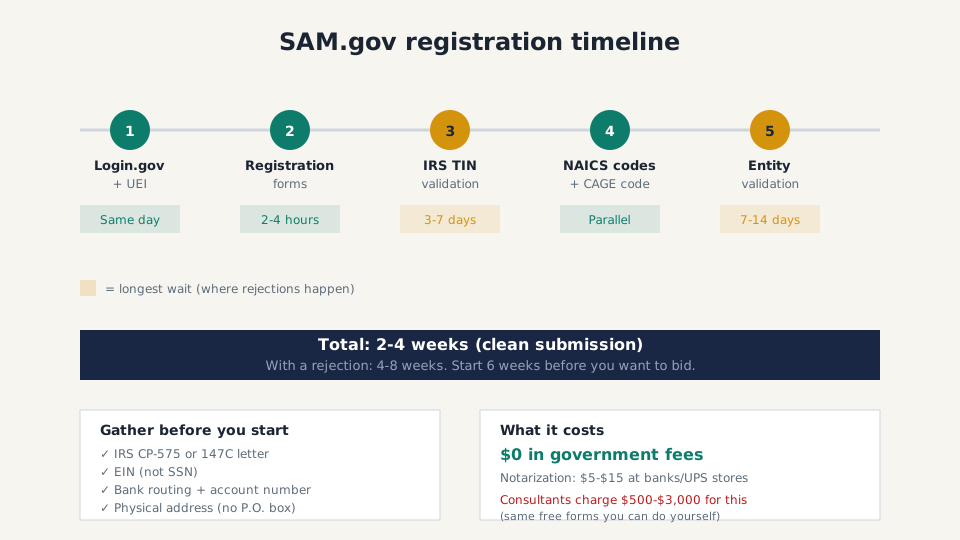
SAM.gov says registration can take up to 10 business days to become active. Treat that as the best-case planning line, not a promise. If you are new to the system, build in extra time for IRS name matching, entity validation, and one possible rejection cycle.
| Phase | Official Estimate | Realistic (2026) |
|---|---|---|
| Login.gov account + MFA setup | Same day | Same day |
| UEI assignment | Same day | Same day |
| Registration forms | 1-2 hours | 2-4 hours with docs ready |
| IRS TIN validation | 2-3 business days | 3-7 business days |
| Entity validation (notarized letter) | 5-7 business days | 7-14 business days |
| CAGE code assignment | 5-10 business days | Parallel with validation |
| Total: clean submission | Up to 10 business days to become active | Build a 2-4 week buffer |
| Total: with a rejection | Not stated | 4-8 weeks |
Start early. Entity validation in particular has been running at the longer end of the 7-14 business day window. Start your SAM.gov registration at least 6 weeks before you want to bid on anything — ideally 8 weeks if you’ve never registered before. That gives you a buffer for one rejection cycle and still leaves time to prepare your first proposal.
Common mistakes that delay everything
- Business name mismatch with IRS records. The number one problem. Get your 147C letter. Match it exactly.
- Starting without documents ready. SAM.gov sessions time out. Scrambling mid-registration costs you progress.
- Too many NAICS codes. Stick to what you actually do. Add more later as capabilities grow.
- Notarized letter errors. Triple-check against your SAM.gov profile before the notary visit.
- Forgetting to renew. Registration expires annually. Set a reminder for 60 days out. Renewal validation takes 48-72 hours, but a lapse means you can’t bid or get paid.
Warning: Companies charge $500-$3,000 to register you in SAM.gov. Some are legitimate. Many just fill out the same free forms you can do yourself. The entire process described here costs $0 in government fees. The only expense is notarization: $5-$15 at most banks and UPS stores.
After your registration goes active
Once SAM.gov shows “Active,” you’re eligible to bid. That week, do four things: verify your entity record is correct, save your UEI and CAGE code somewhere accessible, set up contract opportunity alerts in SAM.gov filtered by your NAICS codes, and mark your annual renewal date on the calendar.
Registration is step one. The real work is finding solicitations, writing proposals, and building past performance. Once your SAM.gov profile is active, use the agency procurement forecasts guide to spot work before the solicitation drops, then use the government bid proposal template when you are ready to respond.
If your registration hits a wall, the SAM.gov rejection troubleshooting guide walks through every common error and how to fix it. When renewal time comes around (365 days from activation), the SAM.gov renewal guide covers what to update and when to start.
Not ready to bid as a prime yet? That is normal. Build your capability statement and use the subcontracting work guide to find primes that already need small business partners.