SAM.gov registration rejected? Here's how to fix every common error
SAM.gov registration rejections happen to roughly one in three first-time registrants, and the error messages are vague enough to make fixing them a guessing game. The system tells you something failed but rarely tells you exactly what or how to correct it. I’ve been through two rejection cycles myself and helped half a dozen other small business owners work through theirs. Here’s what the error messages actually mean and how to fix each one.
If you haven’t started your registration yet, read the complete guide to registering for government contracts first. That walks through the entire process. This post is for people who already started, hit a wall, and need to get unstuck.
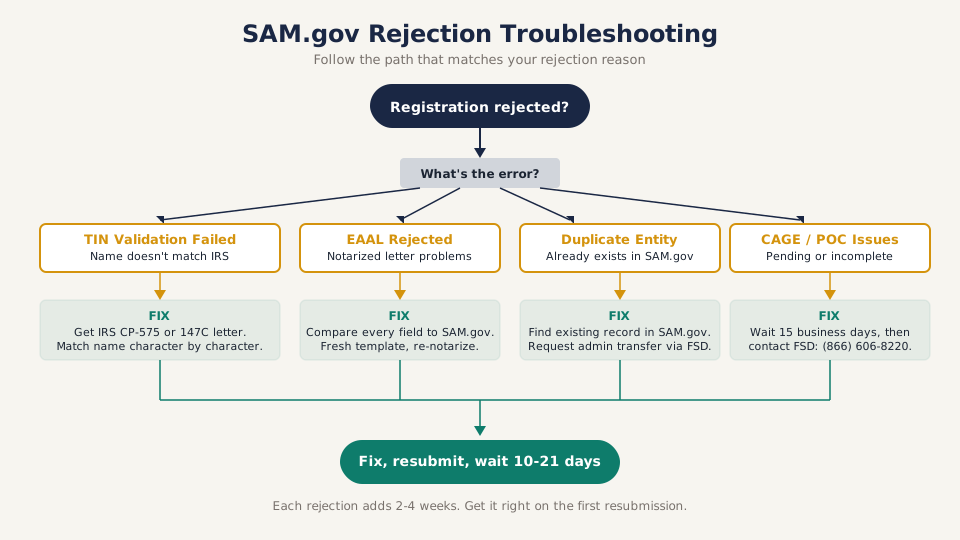
Quick troubleshooting: find your rejection type
Not sure what went wrong? Start here and follow the path that matches your error.
Did you get a TIN/name mismatch error? Your business name in SAM.gov doesn’t match IRS records. Go to the IRS TIN validation section below.
Did you get asked for additional documentation or an EAAL? Your notarized letter has an issue. Go to the entity validation section below.
Did you get a “duplicate entity” error? Someone already registered your business. Go to the duplicate entity section below.
Is your registration stuck with no CAGE code? The Defense Logistics Agency hasn’t assigned it yet. Go to the CAGE code section below.
Did your points of contact get rejected? An email bounced or a field is missing. Go to the POC section below.
No error message, just stuck in “Submitted” for weeks? Go to the Federal Service Desk section below.
Why registrations get rejected
SAM.gov validates your registration against multiple external databases. Your business name and EIN go to the IRS for TIN matching. Your entity information goes through a validation process that may require a notarized letter. Your CAGE code gets assigned by the Defense Logistics Agency. A failure at any of these checkpoints stops the whole registration.
The system doesn’t process these checks in parallel. They run sequentially. A TIN mismatch at step one means you never get to entity validation at step two. Fix the first problem, resubmit, wait for the next checkpoint — and potentially hit a different rejection.
Average time from a clean first submission to active registration: 2 to 4 weeks. Average time with one rejection cycle: 4 to 8 weeks. That’s why getting it right matters.
IRS TIN validation failed
This is the most common rejection. SAM.gov sends your Taxpayer Identification Number (EIN or SSN) and legal business name to the IRS for verification. If they don’t match, the registration is rejected.
What the error looks like: “TIN Matching - Entity Name does not match IRS records” or “Unable to validate TIN.”
Why it happens:
The match is character-for-character exact. The IRS has your business name stored exactly as it appeared on your EIN application. If the IRS has “Smith Consulting Services LLC” and you typed “Smith Consulting Services, LLC” with a comma, the match fails. If they have “LLC” and you typed “L.L.C.” — rejected. If they have your first name as “Robert” and you used “Bob” — rejected.
How to fix it:
- Find your IRS CP-575 letter (the one they sent when your EIN was assigned). Match your SAM.gov entry to that letter character by character.
- If you lost the CP-575, call the IRS Business & Specialty Tax Line at (800) 829-4933 and request a 147C verification letter. It confirms exactly how the IRS has your business name and EIN on file.
- Once you have the exact name, go back into SAM.gov, update the Legal Business Name field to match, and resubmit.
Common traps:
- DBA vs. legal name. SAM.gov wants the legal name on file with the IRS, not your trade name or “doing business as” name. If you filed your EIN as “Robert Smith” (sole proprietor) but do business as “Smith Consulting,” enter “Robert Smith.”
- Leading zeros in the EIN. EINs are 9 digits. If yours starts with a zero (like 02-1234567), make sure that leading zero is there. Some browsers and form fields strip it.
- Recent name changes. If you changed your business name with your state but haven’t updated it with the IRS (Form 8822-B), the IRS still has the old name. File the 8822-B first, wait for IRS confirmation, then register in SAM.gov.
Plain English: TIN validation
TIN stands for Taxpayer Identification Number — it’s your EIN (for businesses) or SSN (for sole proprietors). SAM.gov sends your TIN and business name to the IRS and asks “does this match?” If the IRS has your name spelled differently by even one character — a comma, a period, an extra space — the answer comes back “no” and your registration gets rejected. The fix is always the same: get the CP-575 or 147C letter from the IRS and copy your business name character by character.
Entity validation failed (the notarized letter)
After TIN validation passes, SAM.gov requires entity validation to confirm that the person registering is authorized to act for the business. For most registrants, this means submitting a notarized Entity Administrator Appointment Letter (EAAL).
What the error looks like: “Entity Validation - Additional documentation required” or “EAAL rejected.”
Why it happens:
The EAAL has specific fields that must match your SAM.gov registration exactly. Any mismatch between the letter and your registration data triggers a rejection.
Plain English: EAAL (Entity Administrator Appointment Letter)
The EAAL is a one-page form that says “I, the owner/CEO of this company, authorize this person to manage our SAM.gov account.” You fill it out, get it notarized ($5-$15 at a UPS Store or bank), and upload it. The government uses it to make sure random people aren’t registering businesses they don’t own. The main reason it gets rejected: information on the letter doesn’t exactly match your SAM.gov registration.
The most common EAAL rejection reasons:
1. Information mismatch. The email address, phone number, or physical address in the EAAL doesn’t match what you entered in SAM.gov. The Federal Service Desk compares every field. If your EAAL says your address is “123 Main St” but SAM.gov has “123 Main Street,” that’s a mismatch.
2. Wrong UEI. Your UEI is 12 characters. Miss one, transpose two, or copy an old DUNS number instead, and the letter gets rejected. If you’re not sure about your UEI, look it up first — the DUNS vs UEI guide explains how.
3. Missing administration preference. The EAAL template asks whether you’ll self-administer your SAM.gov account or use a third-party agent. You must choose one. Leaving it blank is a rejection.
4. Wrong signer. The EAAL must be signed by someone with legal authority over the entity. For an LLC, that’s the managing member or a manager named in the operating agreement. For a corporation, it’s an officer (CEO, President, VP). For a sole proprietor, it’s the owner. A signed letter from your bookkeeper or office manager gets rejected.
5. Notarization issues. The notary must sign, stamp, and date the letter. Some states require a notary seal (embossed stamp) in addition to the ink stamp. If your state requires it and the seal is missing, the letter gets rejected.
How to fix it:
- Download a fresh EAAL template from the link SAM.gov emailed you (don’t reuse an old one — templates get updated).
- Open your SAM.gov registration in another browser tab.
- Compare every field in the EAAL against your SAM.gov data: legal business name, UEI, physical address, email, phone, administration preference.
- Print, sign, and notarize. Triple-check before the notary stamps it.
- Upload through SAM.gov or email to the Federal Service Desk at www.fsd.gov.
Tip
Compare the letter field-by-field against your SAM.gov profile before you visit the notary. Reprinting and re-signing is free. Getting re-notarized and resubmitting costs another 7 to 14 business days of waiting.
Duplicate entity detected
What the error looks like: “Entity already exists in SAM.gov” or “Duplicate UEI detected.”
Plain English: duplicate entity
This error means SAM.gov already has a registration for your business. Maybe a former employee set one up, maybe a consultant did it on your behalf years ago, or maybe you started a registration and abandoned it partway through. The fix is to take over the existing registration — not create a second one.
Why it happens:
Someone previously registered your business in SAM.gov — a former employee, a consultant, or a previous owner. Or you started a registration, abandoned it, and started a new one without realizing the first attempt created a partial record.
How to fix it:
- Search for your business in SAM.gov’s public entity database. If an existing registration appears, note the UEI and check who the entity administrator is.
- If you’re the rightful owner and the previous admin is no longer with the business, contact the Federal Service Desk and request an administrator change. You’ll need to submit an EAAL naming yourself as the new administrator.
- If a consultant registered on your behalf and is listed as the administrator, contact them to transfer administration to you. If you can’t reach them, the Federal Service Desk can initiate a transfer — but expect it to take 2 to 4 weeks.
- Do not create a second registration. Having two active registrations for the same entity creates CAGE code conflicts and can flag your business in the system. Fix the existing record rather than starting over.
CAGE code not assigned
What the error looks like: Your registration shows as pending or incomplete even after TIN and entity validation have passed. No CAGE code appears in your entity record.
Why it happens:
The CAGE code is assigned by the Defense Logistics Agency (DLA), not by SAM.gov. It’s a separate process that runs after your SAM.gov validation clears. For U.S. businesses, this typically takes 5 to 10 business days after entity validation. But it can take longer if the DLA’s queue is backed up or if your business information doesn’t match what’s in their system.
How to fix it:
In most cases, you wait. The CAGE code assignment runs in parallel with the later stages of SAM.gov processing. If it’s been more than 15 business days since your entity validation cleared and you still don’t have a CAGE code, contact the Federal Service Desk and ask them to check the status with DLA.
International businesses need an NCAGE code from their country’s NATO codification bureau before they can complete SAM.gov registration. That’s a separate application process.
Key Requirements: You don’t apply for a CAGE code separately. It’s assigned automatically as part of SAM.gov registration. Any website charging you for a CAGE code is selling something you get for free.
Points of contact rejected
What the error looks like: “Electronic Business POC validation failed” or “Government Business POC information incomplete.”
Why it happens:
SAM.gov requires at least two points of contact: a Government Business POC and an Electronic Business POC. Each needs a valid email address, phone number, and mailing address. Common rejection reasons:
- Email address doesn’t work. SAM.gov may send a verification email. If it bounces, the POC fails validation.
- Same person for both POCs with identical information. While some registrants use the same person, the system sometimes flags this. Use a slightly different phone number or email if possible.
- Missing information. Every field in the POC section is required. A blank fax number field (where required) or missing middle initial can trigger an error.
How to fix it:
Use email addresses you actually check. Business email is better than a personal Gmail. Make sure the phone numbers are current and the addresses match your entity record. Resubmit with complete information for both POC roles.
How long resubmission takes
After you fix a rejection and resubmit, you’re not starting from scratch. The part that already passed (TIN validation, for example) doesn’t repeat. But the part that failed goes back into the queue.
| Checkpoint | First submission | Resubmission after fix |
|---|---|---|
| IRS TIN validation | 3-7 business days | 3-7 business days (it re-validates) |
| Entity validation (EAAL) | 7-14 business days | 7-14 business days |
| CAGE code assignment | 5-10 business days (parallel) | Usually already in progress |
| Total from resubmission | 10-21 business days |
Each rejection cycle adds 2 to 4 weeks to your timeline. That’s why getting the EAAL right on the first resubmission matters so much.
When the Federal Service Desk goes quiet
The Federal Service Desk (FSD) at fsd.gov is your primary support channel for SAM.gov issues. They’re generally responsive — 1 to 3 business days for email tickets, and phone support is available during business hours.
But sometimes tickets stall. If your case has been open for more than 10 business days with no update:
- Call instead of emailing. Phone support can often see real-time status that the email team can’t. The FSD phone number is (866) 606-8220.
- Reference your ticket number. Every FSD submission gets a case number. Always include it when following up.
- Escalate through your congressional representative. Every U.S. House member and Senator has a constituent services team that handles federal agency issues. They can send an inquiry to GSA (which runs SAM.gov) on your behalf. This isn’t going over anyone’s head — it’s a standard process that congressional offices handle routinely.
- Contact your local APEX Accelerator. APEX Accelerators (formerly PTACs) are free, government-funded counseling offices that help small businesses with federal contracting. They have direct contacts at GSA and can sometimes push a stalled registration through channels that aren’t available to individual registrants. Find yours at apexaccelerators.us.
Next Step: Once your registration goes active, set a calendar reminder for 60 days before your annual renewal date. Letting your registration lapse means you can’t bid or get paid. The complete registration guide has the full timeline and renewal details.
Avoid the scam letters
Within weeks of your SAM.gov registration (or rejection), you’ll start receiving official-looking letters and emails demanding payment for your registration, renewal, or CAGE code. These are scams. SAM.gov registration is free. CAGE codes are free. UEIs are free. No legitimate government fee exists for any of these.
The FTC has issued warnings about these solicitations. If you receive one, don’t pay it and don’t call the number on the letter. Report it to the FTC at reportfraud.ftc.gov.
A rejection is frustrating, but it’s fixable. Get your IRS letter, match every character, triple-check the EAAL before the notary stamps it, and give the system time to process. Most rejections clear on the first resubmission when you know what went wrong.
Once your registration goes active, don’t let all that effort go to waste by missing your annual renewal. The SAM.gov renewal guide covers when to start, what to update, and how to avoid the scam letters that show up right on schedule.