How to become a state vendor in Texas: registration, portals, and set-asides
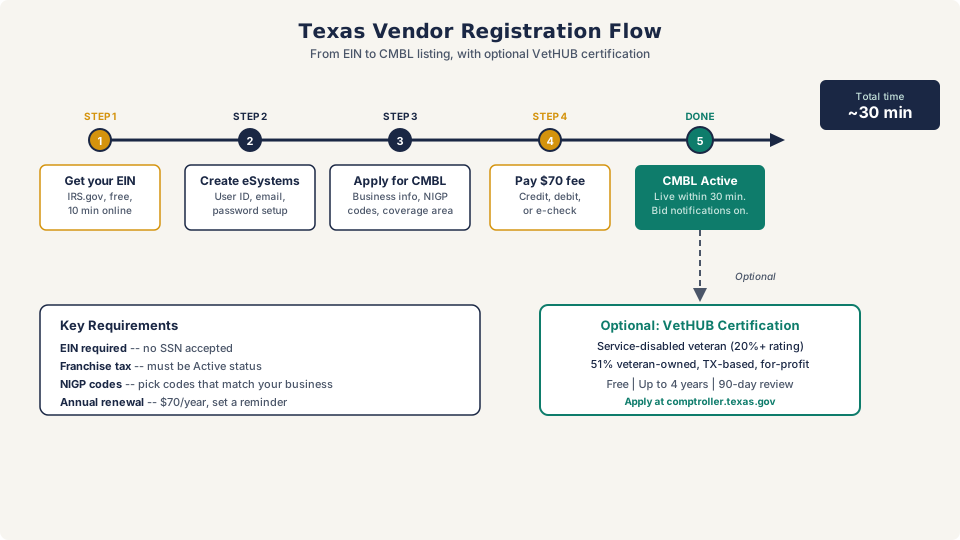
To sell to the state of Texas, you need to register on the Centralized Master Bidders List (CMBL) through the Comptroller’s eSystems portal, pick the NIGP commodity codes that match your products or services, and pay a $70 annual fee. The whole process takes about 30 minutes online, and your registration typically goes active within 30 minutes of submission. Once you’re on the CMBL, state agencies can find you when they need what you sell, and you’ll get automatic bid notifications for your commodity codes.
If you’re coming from the federal side, this is going to feel refreshingly simple. No SAM.gov. No notarized letters. No 4-week validation period. The state and local contracting guide covers how state procurement differs from federal, but here’s the Texas-specific playbook.
What the CMBL is and why it matters
The Centralized Master Bidders List is the Texas Comptroller’s vendor database. When a state agency needs to buy something, they search the CMBL for registered vendors who sell that product or service. If you’re not on the list, you don’t get notified about bid opportunities.
You don’t technically need to be on the CMBL to respond to a posted solicitation. The Electronic State Business Daily (ESBD) is public, and anyone can submit a bid on a posting they find there. But without CMBL registration, you won’t receive automatic notifications when agencies post solicitations matching your commodity codes. You’re relying entirely on manually checking the ESBD every day. That’s a bad strategy.
The CMBL does two things for you: it puts your business in front of state purchasers who are actively looking for vendors, and it sends you bid notifications based on the NIGP codes you selected during registration. For purchases under $5,000, agencies can call and order directly from CMBL-listed vendors without competitive bidding. That means they might contact you directly.
Step-by-step CMBL registration
Here’s the exact process. It takes about 30 minutes if you have your documents ready.
Before you start, gather these
- Your EIN (Employer Identification Number). The Comptroller requires an EIN. They won’t accept a Social Security number for vendor registration. If you don’t have an EIN, get one from the IRS at irs.gov/ein — it’s free and takes 10 minutes online.
- Your franchise tax status. Texas has no income tax, but it has a franchise tax. Your business needs to be in good standing with the Texas Comptroller’s office. You can check your status at the Comptroller’s Franchise Tax Account Status page. If your status shows anything other than “Active,” resolve that before registering.
- NIGP commodity codes for your products or services. NIGP (National Institute of Governmental Purchasing) codes are how Texas categorizes what vendors sell. There are hundreds of codes organized by class and item. Browse the Comptroller’s NIGP Code Listing before you register and write down the class and item codes that match your business. Pick the ones that genuinely describe what you sell. Don’t select 50 codes hoping for more notifications — agencies will question why an IT consulting firm is registered under janitorial supplies.
- Your Texas highway district(s). The registration asks which highway districts you can deliver products or services in. This is about geographic coverage. If you serve the entire state, select all of them. If you only work in the DFW area, select the relevant districts.
The registration process
Step 1: Create an eSystems account. Go to the Comptroller’s eSystems portal at comptroller.texas.gov and click “Create Password.” You’ll set up a user ID, email, password, and security questions. Complete the email verification.
Step 2: Apply for CMBL. Once logged in, select “Apply for CMBL” from the eSystems menu. The system walks you through each section.
Step 3: Enter your business information. Legal business name, EIN, business structure, physical address, mailing address, and contact information. Make sure your business name matches your Texas franchise tax records exactly.
Step 4: Select your NIGP commodity codes. Browse by class and item. Select the codes that accurately describe your products or services. You can change these later if your business expands.
Step 5: Choose your geographic coverage. Select the highway districts where you can deliver products or services.
Step 6: Pay the $70 annual fee. You can pay by credit card, debit card, or electronic check online. You can also mail a paper check if you prefer, but online payment is processed faster.
That’s it. Your registration should appear on the Comptroller’s SPD website within 30 minutes of payment. You’re now a registered Texas state vendor.
Where to find Texas state bid opportunities
Being on the CMBL gets you notifications, but you should also know where to look proactively.
Electronic State Business Daily (ESBD)
The ESBD at txsmartbuy.gov/esbd is where all state agency solicitations over $25,000 get posted. You don’t need an account to search it. The ESBD lets you filter by agency, status (Posted, Awarded, Closed), NIGP class/item codes, keyword, solicitation ID, or date range.
Check the ESBD regularly even if you’re getting CMBL notifications. Not every opportunity lands in your inbox — it depends on how precisely your NIGP codes match the solicitation. The ESBD catches what the notification system misses.
The ESBD includes four categories of postings: active solicitations, awards without solicitation, pre-solicitations (advance notices that something is coming), and grant opportunities. The pre-solicitation tab is underrated. It gives you a heads-up on upcoming bids before the clock starts.
Texas SmartBuy
Texas SmartBuy (txsmartbuy.com) is the state’s e-procurement system. It’s primarily a purchasing portal — where state agencies actually place orders — but vendors listed on statewide contracts can have their products and services displayed for easy ordering.
For most small businesses, the ESBD is where you’ll find new opportunities. SmartBuy is more relevant once you’ve won a statewide contract and need to fulfill orders through the system.
Agency-specific solicitations
Not every Texas agency posts exclusively through the ESBD. Some agencies, especially larger ones like TxDOT, the Department of Information Resources (DIR), and the Health and Human Services Commission (HHSC), maintain their own solicitation pages with additional opportunities. If you’re targeting a specific agency, bookmark their procurement page directly.
DIR is particularly active in IT contracting. Their Schedule of Solicitation Opportunities page lists technology-related procurements that may not appear on the ESBD until later in the process.
Texas procurement thresholds: what they mean for small vendors
Understanding Texas procurement thresholds tells you where the easiest entry points are.
| Purchase amount | Procurement method | What this means for you |
|---|---|---|
| Under $5,000 | Agency calls vendors directly | Get on the CMBL. Agencies can buy from you with a phone call. |
| $5,000 to $10,000 | Informal bids (minimum 3 quotes) | Quick-turnaround opportunities. Respond fast. |
| $10,000 to $25,000 | Formal competitive sealed bids | Requires written bid. Still manageable paperwork. |
| Over $25,000 | Posted on ESBD, full competitive process | Formal solicitation with evaluation criteria. |
| Over $100,000 (services) | Comptroller-managed procurement | Larger contracts handled by the Statewide Procurement Division. |
The sweet spot for small businesses breaking in is the under-$25,000 range. These purchases don’t require a public posting on the ESBD. Agencies pull directly from the CMBL to find vendors. Being registered with the right NIGP codes and geographic coverage puts you in the pool for these smaller, faster-turnaround purchases.
Tip
When you first register on the CMBL, agencies won’t know you exist beyond what the database shows. Call the procurement offices at agencies you want to work with and introduce yourself. Ask if they accept capability statements. The state and local contracting guide covers how to approach agency buyers effectively.
VetHUB certification: the current state of Texas set-asides
The Texas set-aside program underwent a major restructuring in December 2025. Here’s what happened and what it means for your business.
What changed
Texas previously ran a Historically Underutilized Business (HUB) program that certified businesses owned by minorities, women, and service-disabled veterans. Certified HUB vendors received bid notification preferences, and state agencies had HUB participation goals they were expected to meet.
On December 2, 2025, Acting Comptroller Kelly Hancock announced emergency rules that restructured the HUB program into the Veteran Heroes United in Business (VetHUB) program. The new program limits certification exclusively to service-disabled veteran-owned businesses. Roughly 14,000 businesses that were certified under the old HUB program based on race, ethnicity, or sex lost their certifications.
Who qualifies for VetHUB now
To be eligible for VetHUB certification, your business must meet all of these:
- 51% or more owned, managed, and operated by one or more service-disabled veterans
- Service-connected disability rating of 20% or higher from the federal military department
- Primarily based in Texas with its principal place of business in the state
- For-profit entity that complies with SBA size standards (13 CFR Section 121.201)
If you’re a service-disabled veteran and meet these requirements, VetHUB certification is free and good for up to four years.
How to apply for VetHUB
- Register on the CMBL first (the steps above).
- Go to the Comptroller’s VetHUB certification page at comptroller.texas.gov/purchasing/vendor/hub/certification-process.php.
- Submit your application through the online certification portal. No paper applications are accepted — everything goes through the vendor record in the certification system.
- Provide ownership documentation, including a stock or membership issuance/transfer ledger showing veteran ownership of 51% or more.
- Provide your service-connected disability documentation from the VA or federal military department.
- Wait up to 90 days for review. A certification specialist will contact you if anything is unclear or missing.
Once approved, your business appears in the VetHUB Directory, and you’re eligible for direct contact on state purchases under $10,000 and subcontracting opportunities on contracts over $100,000.
If you don’t qualify for VetHUB
If you’re a woman-owned or minority-owned business that previously benefited from HUB certification, the state program no longer applies to you. But federal certifications still exist and still carry weight. The set-aside certifications guide covers the SBA’s WOSB, 8(a), and SDVOSB programs, all of which are separate from Texas state programs.
You can also pursue certification through third-party organizations like the South Central Minority Supplier Development Council (SMSDC) or the Women’s Business Enterprise National Council (WBENC). These don’t carry the same state procurement advantages the old HUB program did, but they can open doors with private-sector prime contractors who have supplier diversity goals.
APEX Accelerators in Texas: free help you’re probably not using
APEX Accelerators (formerly known as PTACs — Procurement Technical Assistance Centers) are federally funded offices that help small businesses win government contracts at every level: federal, state, and local. The counseling is free. They’ll help you with registration, bid responses, certification applications, and finding opportunities. There is no catch.
Texas has multiple APEX Accelerator offices covering different regions of the state:
| Organization | Coverage Area | Phone | Website |
|---|---|---|---|
| University of Houston APEX Accelerator | Greater Houston / Gulf Coast | (713) 752-8477 | ptac.uh.edu |
| UTSA APEX Accelerator | San Antonio / South-Central Texas | (210) 458-2460 | apexaccelerator.iedtexas.org |
| Cross Timbers APEX Accelerator (UT Arlington) | Dallas-Fort Worth / North-Central Texas | (817) 272-5978 | uta.edu/research/centers/cross-timbers |
| Northwest Texas APEX Accelerator (Texas Tech) | Panhandle, West Texas, Abilene | (806) 745-1637 | nwtapex.org |
| UTRGV APEX Accelerator | Rio Grande Valley / South Texas | (956) 665-7535 | utrgv.edu/apex |
| Del Mar College APEX Accelerator | Corpus Christi / Coastal Bend | (361) 698-1021 | delmar.edu/apexaccelerator |
If you’ve never worked a government contract before, start with your nearest APEX Accelerator. They see hundreds of first-time registrants every year. They know the CMBL system, they know the ESBD, and they can review your first bid response before you submit it. I’ve talked to small business owners who tried to figure out state procurement on their own for months, then walked into an APEX office and had it sorted in an afternoon.
Find your nearest office at apexaccelerators.us.
Common mistakes in Texas vendor registration
A few things trip people up that are easy to avoid.
Wrong NIGP codes. Picking the wrong commodity codes means you get notifications for contracts you can’t bid on and miss notifications for contracts you can. Spend 20 minutes browsing the NIGP code listing carefully. If you’re not sure which codes fit your business, call the Comptroller’s vendor hotline at (512) 463-3459. They’ll help you find the right ones.
Franchise tax issues. If your Texas franchise tax account isn’t in good standing, your CMBL registration won’t go through. This catches business owners who incorporated in another state and are doing business in Texas without realizing they owe franchise tax. Check your status before you start the registration.
Letting the CMBL expire. Your registration expires annually. The Comptroller sends a reminder email 40 to 45 days before expiration. If you miss it and your registration lapses, you stop receiving bid notifications and agencies can’t find you in the system. Set your own calendar reminder — don’t rely on the email alone. Renewal is another $70.
Not checking the ESBD. Registering on the CMBL and waiting for notifications to arrive is passive. The vendors who win contracts are the ones who check the ESBD regularly, attend Economic Opportunity Forums (the Comptroller hosts these — they’re free networking events with state purchasers), and make direct contact with agency procurement offices.
Should you pursue state or federal contracts (or both)?
The right answer depends on your business, but here’s a quick way to think about it.
Start with Texas state contracts if:
- You’re new to government contracting and want a faster, simpler entry point
- Your business is service-based and serves a geographic area (janitorial, landscaping, IT support, consulting)
- You want to build past performance and references before tackling federal work
- You can deliver products or services to state agencies in your region
Start with federal contracts if:
- You qualify for a federal set-aside certification (8(a), WOSB, SDVOSB, HUBZone) that gives you access to less-competitive bidding pools
- Your product or service is specialized enough to match federal NAICS code requirements
- You’re comfortable with a longer registration and procurement timeline
- Your target agencies are federal (DoD, VA, GSA, etc.)
Pursue both if:
- You have the bandwidth to monitor two sets of bid portals
- Your products or services are relevant at both levels
- You want to maximize your pipeline and don’t want to depend on a single government buyer
Most small businesses I talk to do best starting with state work — the registration is faster, the contracts are smaller and simpler, and you build the experience and confidence you need before stepping up to federal. But if you clearly qualify for a federal set-aside, that certification advantage can be worth the longer process.
Federal vs. Texas state registration: a quick comparison
If you’re already registered in SAM.gov for federal work, or thinking about it, here’s how the two systems compare.
| Federal (SAM.gov) | Texas (CMBL) | |
|---|---|---|
| Registration fee | Free | $70/year |
| Processing time | 2-4 weeks | ~30 minutes |
| Entity validation | Notarized letter, IRS check | Franchise tax check only |
| ID number | UEI (replaces DUNS) | EIN |
| Set-aside programs | 8(a), WOSB, SDVOSB, HUBZone | VetHUB only (since Dec 2025) |
| Bid portal | SAM.gov Contract Opportunities | ESBD (txsmartbuy.gov/esbd) |
| Renewal | Annual, free | Annual, $70 |
The federal process is longer and more involved, but registration is free. Texas charges $70 but gets you set up in an afternoon. If you’re considering both, start with the CMBL since it’s faster, get your first state contract under your belt, and then tackle the federal registration process when you’re ready to scale up.
Your first step: go to the Comptroller’s eSystems portal, gather your EIN and NIGP codes, and register for the CMBL today. The $70 fee is less than a business lunch, and it puts you in front of every state agency in Texas that buys what you sell. Once you’re registered, call your nearest APEX Accelerator and ask them to walk you through the ESBD. That’s two concrete moves you can make this week.